rev. 15/06/26
www.RufzXP.net - The official Homepage
Mathias Kolpe, DL4MM and Alessandro Vitiello, IV3XYM,
are glad to present RUFZ software for Windows 11, 10, 8.1, 8, 7, 98, ME, 2000, XP and Vista called RufzXP:
Yannis Scutaru, 12 years old, proved speed 1126 cpm (225 wpm) under supervision of the referees!
He improved the World Record again! He now managed to copy speed 1126 cpm at the IARU High Speed Telegraphy Championships 2024 in Tunisia.
The challenge was to receive random callsigns with maximum speed in the RufzXP software and to copy at least one out of 50 callsigns correctly.
Congratulations and GL for the future!
What is RufzXP ?
"Rufz" is the abbreviation of the German word "Rufzeichen-Hören", which means "Listening to Callsigns".
RufzXP is an excellent training software for improving code speed and CW proficiency, particularly in (ultra) high‑speed memory copying of genuine amateur radio callsigns.
Focusing on the enhancement of CW spped skills, it is not a contest simulator and does not simulate QRM.
The program also provides additional tools for tracking training progress and comparing results with other operators through the International RufzXP Toplist.
RufzXP is a "must" for every serious high speed telegraphy operator and is an official competition of IARU High Speed Telegraphy Championships.
"Tancredi" is the name of this special RufzXP version.
How does it work?
RufzXP is quite straightforward - you don't need a manual for its basic functions.
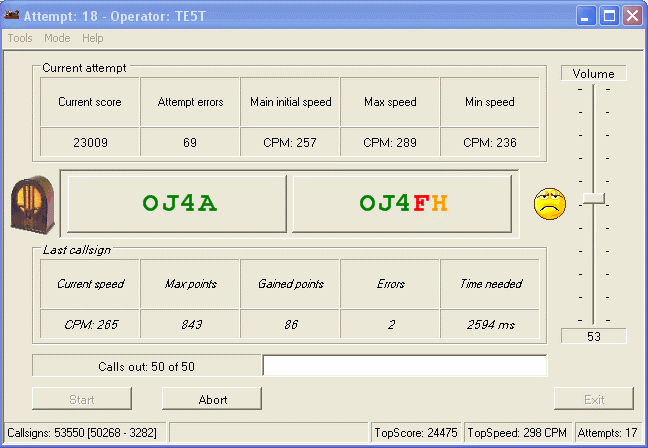
It sends a chosen number of randomly selected, genuine amateur radio callsigns (50 by default) that must be typed into a field on the screen using the keyboard.
After pressing the <ENT> key, the computer sends the next call.
If the call is copied correctly, the transmission speed increases slightly; if not, it decreases.
Thus, the software automatically adapts its sending speed to the user's maximum performance.
Each last call can be replayed once by pressing the F6 key (with a 50% penalty).
The number of points awarded for each call is primarily determined by the CW transmission speed, the number of errors, and the length of the call. Typing time has only a minor influence.
Always consider whether the call you heard is valid or not.
Tone settings and other options can be modified in Option Form. (F2/F12).
<START> button or F5-key starts the attempt. Good luck!
For more details see built-in help. (F1)
At the end of each run, the software provides a precise score, allowing you to track your performance.
With a little practice, you'll soon notice significant progress.
You can compete with operators from all around the world.
Simply use the integrated function to post your score incl. checksum to the RufzXP International Toplist.
More than 3,000 participants from all parts of the world have already submitted their scores
RufzXP is an official contest at the IARU High Speed Telegraphy Championships.
So don't hesitate, download RufzXP now and check it out! Have fun!